
Install and update Cleetus
The public stable product is the Cleetus VS Code extension; download its latest stable release. The instructions below install the extension. Cleetus IDE 0.1.0-dev.4 is an unreleased, unsigned and unnotarized local development build; a signed public native installer has not been published yet. See Cleetus IDE and Studio for its current interface and limitations.
You need VS Code 1.94+, Node.js 22+, npm, and access to the engine you want to use. You may use Claude, Codex, or both. The currently recorded clean-host runtime audit covers macOS ARM64; other supported runtime platforms still need local verification.
Install the extension
- Open Cleetus Releases and choose the latest stable release.
- Download
cleetus-<version>-universal.vsixandSHA256SUMSfrom that release. - Verify the filename and full SHA-256 against
SHA256SUMS. - In VS Code, open Extensions → Install from VSIX… and select the downloaded file. Alternatively, run
code --install-extension /path/to/cleetus-<version>-universal.vsix. - Reload VS Code and open the Cleetus activity-bar icon.
Compute a checksum on macOS with shasum -a 256 <file>, on Linux with sha256sum -c SHA256SUMS, or in PowerShell with Get-FileHash <file> -Algorithm SHA256. A matching checksum establishes consistency with the downloaded release, not an independent publisher signature.
Install the separate Claude runtime
The Claude SDK and executable are not bundled in the VSIX. Install the version specified by the release. For the current release, run:
npm install --prefix "$HOME/.cleetus/runtime" --include=optional --omit=dev --no-audit --no-fund @anthropic-ai/claude-agent-sdk@0.3.312
PowerShell:
npm install --prefix "$env:USERPROFILE\.cleetus\runtime" --include=optional --omit=dev --no-audit --no-fund @anthropic-ai/claude-agent-sdk@0.3.312
You can also download this public repository as a ZIP and run node docs/install-runtime.mjs. Keep install-runtime.mjs and its adjacent runtime-package.json together. This installer uses only Node.js built-ins and npm; it does not require private source access.
Keep optional dependencies enabled: they supply the platform executable. The official Claude VS Code extension is unnecessary. A custom runtime location requires the same CLEETUS_RUNTIME_DIR environment variable when launching VS Code.
Connect your engines
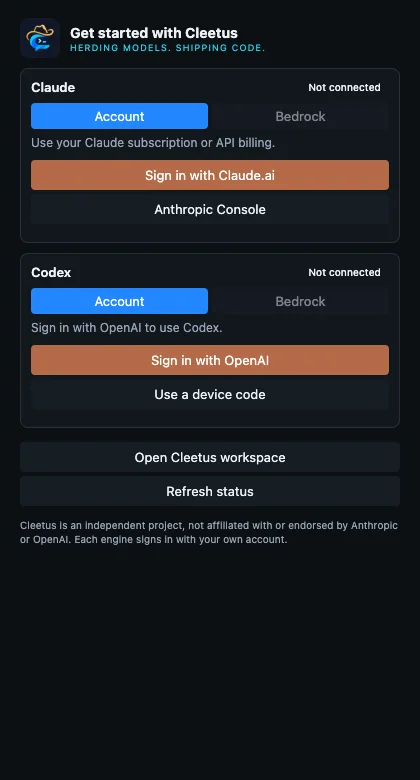
For Claude account access, choose the appropriate Claude.ai or Anthropic Console sign-in and complete the runtime's browser/terminal flow. Bedrock uses your configured AWS region/profile and native credential chain. Account access and provider terms still apply.
For Codex, connect through browser/device sign-in. Cleetus can use a configured executable, a suitable Codex executable supplied by the official extension, or codex on PATH. A standalone CLI is required if no other executable is available. Bedrock support depends on runtime/account capability.
Open a project, then choose Cleetus: Open Workspace. Start with a bounded task, inspect tool requests and diffs, and run relevant checks. Connect accounts locally; installation does not transfer another computer's tokens or history.
Optional LAN collaboration
Both computers need a build with collaboration support: extension 1.11.2 or later, or the corresponding IDE dev.3 build. Each person needs an existing local team and OpenSSL on PATH; openssl version must succeed. Both computers must share the same directly attached private IPv4 subnet. Start no network listener until you choose Collaborate on LAN and approve it. Follow the pairing and proposal guide; there is no automatic discovery or reconnect.
Updates
In ordinary VS Code, these update controls install the extension VSIX. In Cleetus IDE, Check for Updates checks the independent native release channel. A verified notarized IDE installation can stage and recheck a signed installer from the same publisher before you explicitly open it. Unsigned development builds offer release notes only; the updater never replaces the app silently or bypasses Gatekeeper. No public native installer is published yet.
If you installed 1.10.0 or earlier, manually install 1.10.1 or newer once. Older builds check the former release location; they cannot discover releases after its source repository became private. Subsequent updates use this public download repository.
Cleetus checks the public latest stable release shortly after startup, at most once per day after a successful check. Run Cleetus: Check for Updates to check immediately, or disable checkForUpdates in Settings → Extension preferences.
Choose Release notes to review the release, or explicitly choose Download & install. Cleetus verifies the versioned VSIX's size and SHA-256 before asking VS Code to install it. Choose Reload window to activate the new version. It does not silently install updates. Draft/prerelease/incomplete releases and mismatched checksums are rejected.
Engine subscriptions, model usage and third-party services are separate costs. See licensing and troubleshooting.